FAQ
Questions, answered
Pick a topic. We've probably covered it.
What is TagEasy?
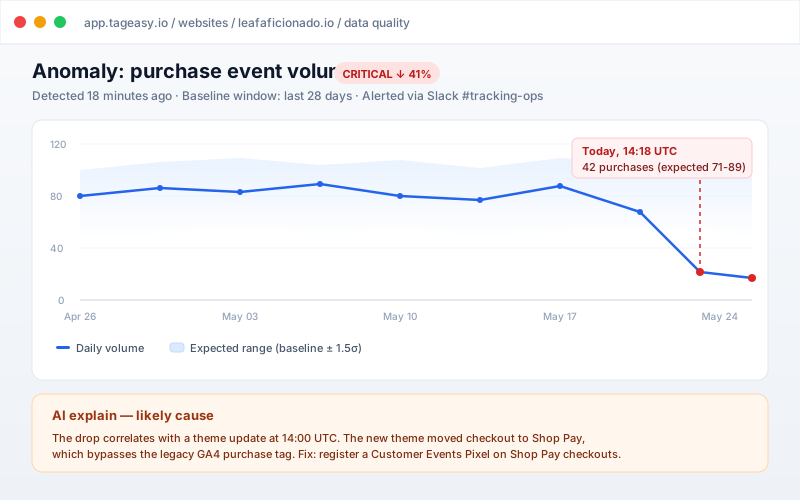
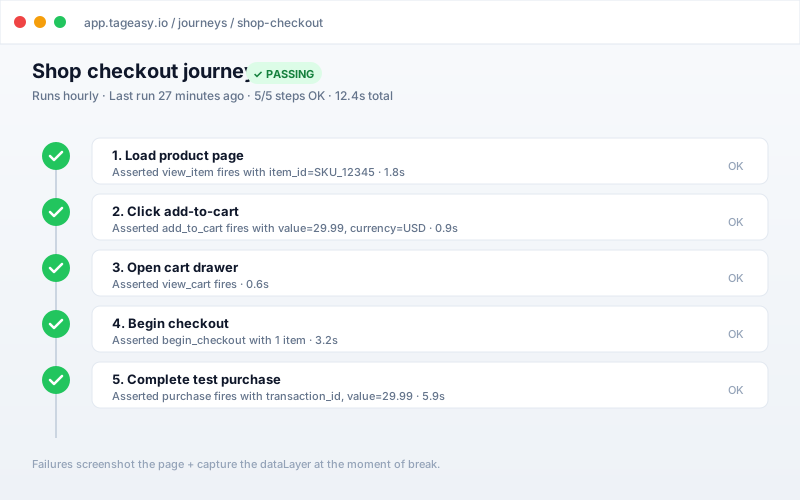
TagEasy is a tag-management platform that sets up conversion tracking across GA4, Google Ads, Meta, and TikTok through a guided 6-step wizard, then monitors it so breakage gets caught before it costs orders. It combines the setup work (generating and publishing GTM tags), the monitoring work (drift detection, synthetic journeys, anomaly alerts), and the audit work (Consent Mode v2, PII scanning, duplicate pixels) that would otherwise need three separate tools plus a consultant.
How much does TagEasy cost?
TagEasy has a free plan covering 1 website and 10,000 events per month with no credit card required. Paid tiers start at $59/month billed monthly, or $49/month billed annually, and add more sites, higher event volume, container audits, server-side tagging, and alerting; the Agency tier adds white-label client reporting and multi-client management. Current pricing for every tier is listed at tageasy.io/pricing, and all paid plans carry a 7-day money-back guarantee.
How is TagEasy different from Google Tag Manager?
Google Tag Manager delivers tags; it does not tell you when they break. GTM has no concept of a tracking plan, no drift detection, no alerting, and no audit of whether your tags respect consent. TagEasy publishes into your own GTM container — it does not replace it — and adds the layer GTM has never had: a specification of what should be tracked, continuous comparison against what your live site is actually doing, and a page to whoever is on call when the two diverge.
Who is TagEasy for?
TagEasy is built for three groups: online stores on any platform (Shopify, WooCommerce, BigCommerce, Magento or custom) that need GA4 and ad-pixel tracking to stay correct without a dedicated analytics hire; lead-gen, SaaS and content sites whose ad bidding depends on form, signup and call conversions they cannot currently verify; and agencies managing tracking across many client sites who need bulk health scans and white-label reporting. It assumes no prior GTM knowledge — the wizard generates the tags — but does not get in the way of people who have it.
How long does it take to set up conversion tracking with TagEasy?
Most sites go from sign-up to a first tracked event in about 5 minutes. The wizard is 6 steps: confirm your site, connect Google, pick your goals, choose quick-start events, configure e-commerce if relevant, then install a snippet. TagEasy watches your live dataLayer and confirms the moment real events arrive, so you know it worked before you leave the flow rather than checking GA4 the next day.
Does TagEasy replace Google Analytics?
No. TagEasy configures and monitors the tracking that feeds GA4, Meta, Google Ads, and TikTok — those platforms still store and report your data. TagEasy owns the layer above them: what should be sent, whether it is being sent correctly, and what to do when it stops.
Does TagEasy support server-side tagging?
Yes. TagEasy generates server-side tagging configurations and forwards events server-to-server to GA4, Meta (Conversions API), Google Ads, and TikTok, including the event_id deduplication that stops browser and server events being counted twice. It also handles the parts teams usually get wrong on their own: hashed-identifier normalisation, consent gating on the server path, and monitoring so a dead server container raises an alert instead of silently dropping conversions.
Do I need a Google Tag Manager account?
Not necessarily. TagEasy can generate standalone GA4 tracking code if you don't want GTM. We recommend GTM for flexibility — you can create a free account at tagmanager.google.com and connect it during setup.
How do I install the tracking code on my website?
Partway through the wizard you get two snippets (one for <head>, one right after <body>) with platform-specific instructions for WordPress, Shopify, Squarespace, and more. Installing early lets TagEasy show live events while you finish configuring.
Can I use TagEasy with my existing GTM setup?
Yes. If you already have a GTM container, you can import our generated configuration as a new workspace or merge specific tags and triggers. We export the container JSON for direct import into GTM.
What e-commerce platforms do you support?
Dedicated guides and platform-aware install steps for Shopify, WordPress, WooCommerce, BigCommerce, and Webflow — plus a generic option that works on Squarespace, Wix, or any custom site via raw HTML snippets.
Is there a REST API for programmatic access?
Yes. /api/v1 is a versioned REST surface authenticated by per-user API keys (Bearer token in the Authorization header). Each key is scoped to one organization and one permission tier — read-only by default, or read+write for scripts that need to mutate. Available on every plan, including Free; create + revoke at /settings/api-keys. Hit GET /api/v1 for the discovery doc, GET /api/v1/whoami to verify a key, then list endpoints for sites and events. Cross-tenant access returns 404, not 403, so the surface can't be enumerated.
Is the generated tracking code GDPR compliant?
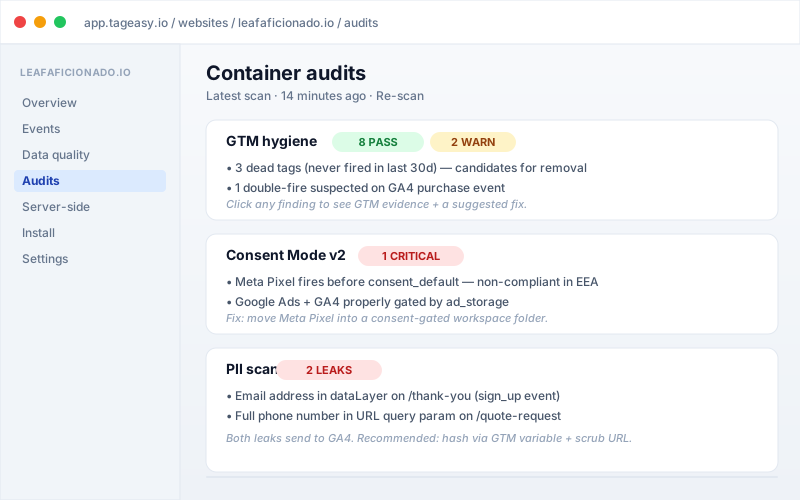
Our code supports Google's Consent Mode v2 and respects consent signals. You still need a cookie banner, but TagEasy also audits your live GTM container for tags firing without consent and ad tags missing v2 signals.
Does TagEasy scan for PII leaks?
Yes. Container audits include a PII scan that checks your dataLayer and URL params for email addresses, phone numbers, and other identifiers being passed to GA4. We flag each leak with a recommended fix.
Is TagEasy GDPR compliant?
TagEasy is built to be operated compliantly and is designed not to collect visitor personal data itself: the audit engine stores per-check results and vendor lists, not page contents, and the PII scanner exists specifically to flag personal data leaking into your analytics. Compliance is still shared — you need a consent management platform and a lawful basis for your own processing. TagEasy supports that side by auditing your live container for tags firing without consent and for missing Consent Mode v2 signals. Full details are at tageasy.io/trust and tageasy.io/privacy.
Can I cancel my subscription anytime?
Yes. Cancel any time and keep access until the end of your billing period. Your configurations and code remain accessible — you just can't make new changes.
What happens if I exceed my website limit?
You'll be prompted to upgrade — we never charge you automatically. You stay in control of when (and whether) to move to a higher tier.
Do you offer refunds?
Seven-day money-back guarantee on all paid plans. Email hello@tageasy.io within 7 days of being charged for a full refund.
How does the free public auditor work — and what do you do with the data?
Drop any URL on /check and TagEasy fetches the homepage once, runs 17 tracking-quality checks (14 scored, 3 informational: GA4, GTM, Consent Mode v2, PII, vendor detection, script weight, CMP, HTTPS, debug-leak, and more), and returns a 0–100 score plus a shareable report. The audit doesn't store the page contents — only the per-check tally, vendor list, and platform guess. Aggregated, this is what powers /benchmarks. No API key, no signup, no obligation — and yes, you can audit your competitor.
I own a domain that has a public TagEasy profile. Can I claim it?
Yes. On /sites/{your-domain} you'll see a "Claim this domain" panel. Sign in, click Start verification, publish the DNS TXT record we give you (24h TTL), then hit Verify. We resolve the TXT record live, match it against your token, and stamp the profile with a verified badge. One claim per domain. After verification you can choose what's surfaced on the profile.
Can I integrate the public auditor data into my own dashboard?
Yes — there are three free read endpoints, all CORS-open, no API key required, 60 requests/hour per IP. GET /api/public-audit/by-domain/{domain} returns the latest audit as JSON. GET /api/public-audit/benchmarks returns the aggregate stats with optional ?segment= filter. GET /api/public-badge/{domain}.svg returns an embeddable score badge. There's also an Atom feed at /sites/atom for recent significant score changes.
What does TagEasy do that GTM, ObservePoint, or DataSlayer don't?
TagEasy combines three things those tools don't: (1) public benchmarks built from a real, open audit corpus, so "is my Consent Mode v2 setup good?" gets a numerical answer; (2) an AI co-pilot that compares what TagEasy thinks is configured against what your live homepage is actually loading, which is where most tracking bugs hide; (3) per-domain shareable profiles that owners can verify via DNS, so the dataset has trust attached to it.
3 more answers on this topic in the full FAQ, and the jargon is defined in the tracking glossary.
Still stuck? Ask us anything →